← Back to AlltraTech

AlltraShow logo AlltraShow

Presentation Software

You know the moment: the wrong file opens, a format won’t load, the software freezes... right when your audience is watching. AlltraShow ends that. All of your media in one playlist. Flawless playback. Set it up in minutes. Run it live with confidence.

Download Free Version

Introductory Offer: $14.99 USD  ·  One-time purchase  ·  No subscription  · Works with Windows 10 / 11

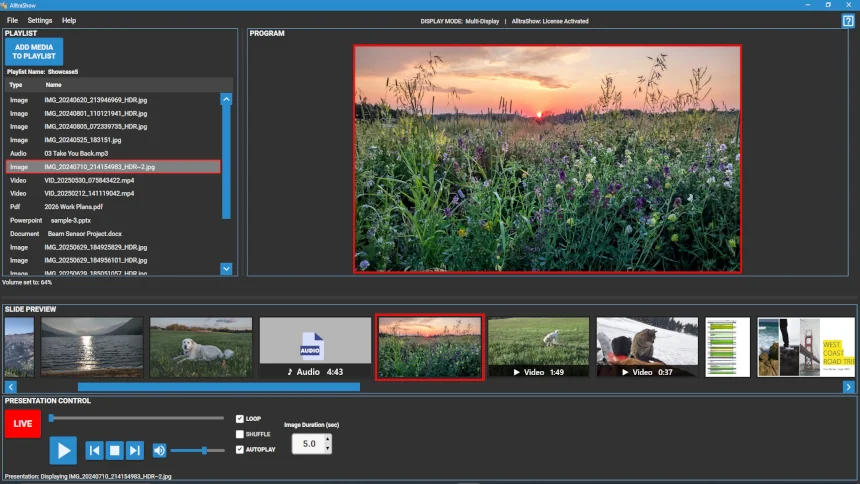
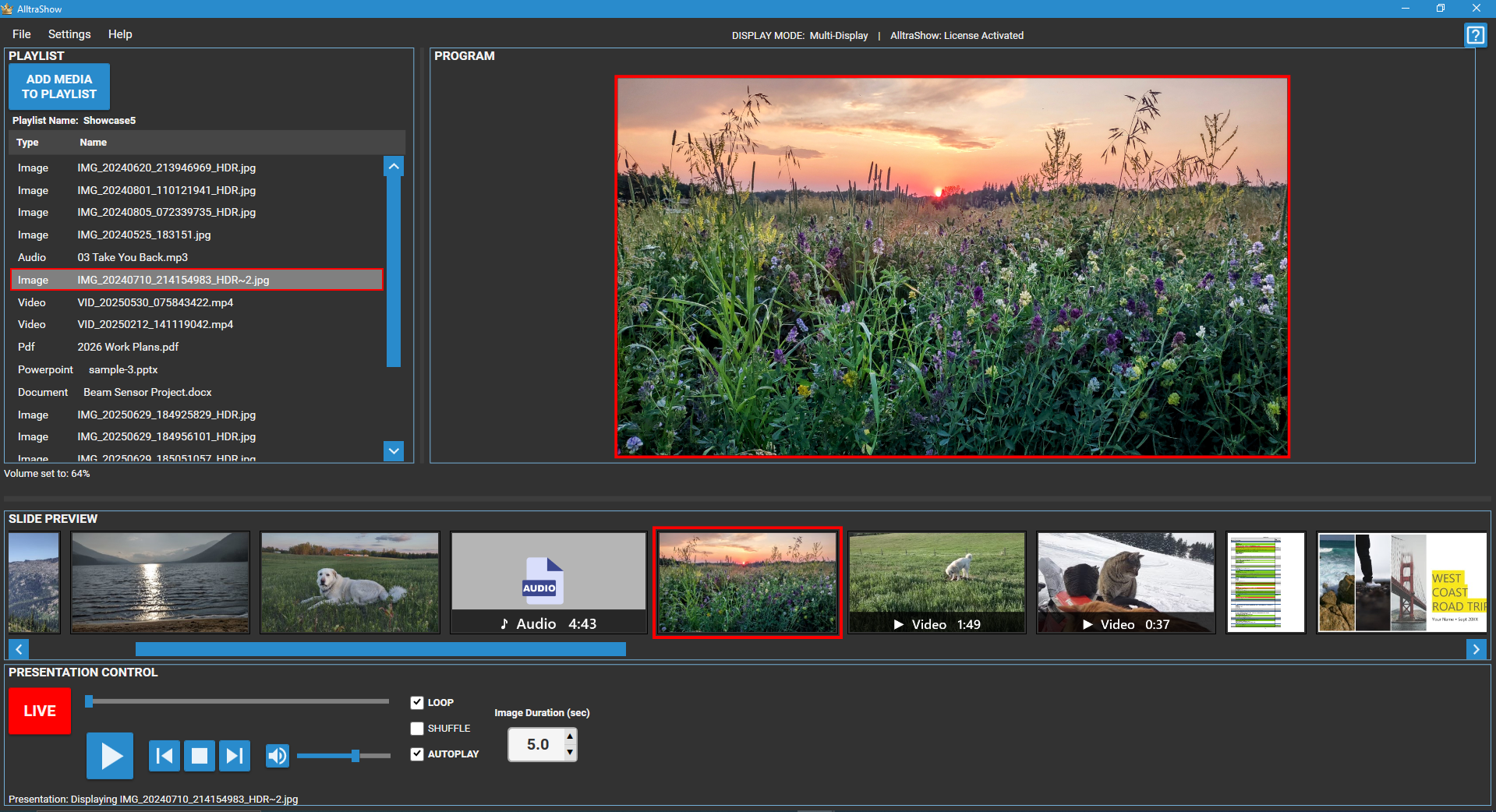
AlltraShow main window showing a playlist with video, image, and audio files

Click image to view full resolution

Up and Running in Three Steps

1

Download AlltraShow

Grab the free version; no account required. Install it, open it. You’re already ahead of the curve.

2

Build Your Playlist

Drag in your images, videos, PDFs, and slides. Arrange the order in seconds. Hit save. Your presentation is ready to go.

3

Press Play

Your presentation runs flawlessly. Your audience stays engaged. You focus on delivering — not troubleshooting.

Why Presenters Choose AlltraShow

Most presentation software is just too complex. If you just need to press Play and look professional, that complexity works against you. AlltraShow is built around your workflow.

Confident From the First Click

Complex software steals your confidence before you even walk into the room. AlltraShow is ready in minutes: load your media files, build your playlist, press Play. That’s the entire workflow. No training. No manual. No stress.

Every Media Type, One Playlist

Images, video, audio, PDFs, Word and PowerPoint files all live in a single, organized playlist. No switching apps. No juggling windows. No last-minute scramble when your audience is already watching.

Controls That Disappear Into Instinct

Play/Pause, Stop, Next/Previous, Volume, Mute — all exactly where you expect them. Run your show without looking at the screen. Your audience sees you as a professional. You feel like one.

Build Once. Present Forever.

Save your playlist and reopen it next week exactly as you left it. Your weekly class never starts from scratch. Build once, reuse forever.

Free Version vs. Licensed

One download. Try it for free. Buy licensed version when you're ready.

FeatureFree VersionLicensed ($14.99 USD)
All supported media formats
Full playback controls (Play, Pause, Stop, Next, Prev)
Live presentation window
Save & reopen playlists
Loop, shuffle, autoplay
Keyboard shortcuts
Playlist itemsUp to 5Unlimited ✓
Individual SlidesUp to 50Unlimited ✓
Time limitNoneNone

One Small Investment. Zero Ongoing Costs.

Regular price: $29.99 USD

$14.99 USD

Introductory Offer — Early Release Pricing

  • Buy once, own it forever
  • No subscription, no renewal fees
  • Unlimited playlist items
  • 30 day money-back guarantee — no questions asked

One-time purchase  ·  No subscription  ·  Works with Windows 10 / 11

AlltraShow vs. Complex Alternatives

AlltraShowTypical Alternatives
Time to get started10 minutesDays or weeks of training
Pricing model$14.99 USD one-time$275 or more per year
Subscription requiredNeverYes
Free Version availableYes — no time limitMay be time-limited
Feature complexityEverything you needHundreds of features you will never use
Supported media typesVideo, Audio, Images, PDF, Word, PowerPointVaries, often limited

Who Uses AlltraShow

AlltraShow was built for one kind of person: someone who needs their presentation to look professional without spending days learning software to make it happen. If that’s you, you’re in the right place.

Houses of Worship

Run song lyrics, sermon slides, and announcement videos smoothly every service.

Schools & Educators

Mix lecture slides, instructional videos, and audio clips in one session. Keep students engaged without switching between multiple apps.

Businesses

Loop product photos, promotional videos, and branded content on a lobby TV or conference room display.

Events & Production Crews

Run tight, professional presentations where timing matters.

Media Enthusiasts

Love VLC but wish it had support for Powerpoint, Word & PDF files? Give AlltraShow a try.

Podcasters & Streamers

Display slides and video clips during live recordings without extra "clutter" showing on the presentation screen and without the complexity of broadcast software.

Everything Included

Playlist-Driven Workflow

  • Add images, video, audio, PDFs, Word and PowerPoint files to a single playlist
  • Simply Drag-and-drop media files to reorder your playlist in seconds
  • Save and reopen playlists

Confident Live Playback

  • Play, Pause, Stop, Next, and Previous controls are arranged and sized for easy operation
  • Video timeline scrubbing and countdown timer so you always know where you are
  • Loop, Shuffle & Autoplay for automated display loops
  • Volume and mute controls for clean audio management during live sessions

Professional Presentation Display

  • Dedicated full-screen presentation window on a second monitor or projector
  • Flexible background behaviour so the display always looks intentional
  • Keyboard shortcuts for fast, eyes-free operation during live delivery

Frequently Asked Questions

What file formats does AlltraShow support?
AlltraShow supports the most common media types: JPEG, PNG, GIF, BMP, TIFF, WEBP (images); MP4, AVI, MOV, MKV, WMV, FLV (video); MP3, WAV, AAC, FLAC, OGG (audio); PDF documents; Microsoft Word files (DOC, DOCX) and PowerPoint files (PPTX).
Does AlltraShow run on Mac or Linux?
AlltraShow currently supports Windows 10 and Windows 11 only. We may decide to offer new platform support in the future: if you have a request for Linux or Mac support, please send us feedback!
What is the difference between the Free Version and the Licensed version?
Both versions are fully functional with all supported media formats and all playback controls. The only difference is that the Free Version limits your playlist to 5 items and up to 50 individual slides. The Licensed version removes that limit entirely, giving you unlimited playlist items. There is no time limit on the Free Version — use it as long as you like.
Is this really a one-time purchase? No hidden subscriptions?
Yes, absolutely. You pay $14.99 USD once and own AlltraShow forever. There are no monthly fees and no annual renewals.
What is your refund policy?
We offer a 30 day money-back guarantee, no questions asked. If AlltraShow does not work for you within 30 days of purchase, contact us for a full refund. See our Refund Policy for full details.
How do I get my license after purchasing?
Immediately after your purchase is confirmed, you will receive an email with your license key and a download link. Installation takes just a few minutes. Check your spam folder if the email does not arrive within five minutes, or contact us and we will resend it.
Can I use my license key on multiple computers?
The license key is for use on a single computer. Please purchase one license for each computer on which you will be using AlltraShow.
What if I get a new computer? Can I transfer my license?
Yes. Your license can be deactivated on your current machine and reactivated on a new one. If you have any trouble with the transfer, contact us and we will sort it out promptly.

Your Next Presentation Is Coming. Will You Be Ready?

Every week spent wrestling with the wrong software is another week of unnecessary stress, missed moments, and presentations that don’t reflect your best work. AlltraShow changes that permanently.

Start free today. Upgrade whenever you’re ready. Either way, you’ll never fight your presentation software again.

Download Free Version

Windows 10 / 11  ·  One-time purchase  ·  30 day money-back guarantee